

Introduction
Creating a Senior School Grade 10 timetable under the Competency-Based Curriculum (CBC) is a complex but manageable task when guided by clear policy and structured planning. Unlike junior secondary, senior school timetabling must balance core subjects, pathway electives, support subjects, learner well-being, and resource constraints.
This guide provides a step-by-step procedure for creating a Senior School Grade 10 timetable for a school offering all three pathways:
- STEM
- Social Sciences
- Arts and Sports Sciences
The process demonstrated here follows official Senior School timetabling guidelines by the Ministry of Education and uses the ASc Timetable software.
Step 1: Understand Senior School Timetabling Guidelines
Before opening any timetabling software, the committee must fully understand the official guidelines.
Key Guidelines for Grade 10, 11 & 12
- 8 lessons per day
- 40 lessons per week
- Each lesson lasts 40 minutes
- Reporting time: 8.00 am
- Lessons run from 8.20 am – 3.20 pm
- 8.00 – 8.20 am reserved for roll call, assembly, and class meetings
- PE: 3 lessons per week
- ICT: 2 lessons per week
- Pastoral/Religious Programme Instruction (P/RPI): 1 lesson per week
- Learner Personal/Group Study: 1 lesson per week
- Only one double lesson allowed (Arts & Sports Science or STEM)
- Core and support subjects must be single lessons
- Subjects with similar skills should not follow one another
- Balanced distribution of subjects between morning and afternoon sessions
- Health breaks:
- After every two lessons
- First break: 10 minutes
- Second break: 30 minutes
- Lunch break: 1 hour
- Non-formal programmes occur after 3.20 pm
Step 2: Analyse the School Profile
Effective timetabling begins with accurate school data.
School Profile Summary
- Total Grade 10 student population: 880
- Pathway ratio: STEM : Social Sciences : Arts & Sports Science = 6 : 5 : 1
- Total Grade 10 streams: 12
Grade 10 Streams
A. STEM (6 streams)
10B – Blue
10C – Central
10E – East
10G – Green
10N – North
10R – Red
B. Social Sciences (5 streams)
10W – West
10P – Purple
10V – Violet
10I – Indigo
10O – Orange
C. Arts & Sports Sciences (1 stream)
10A – Achievers
Step 3: Define Subjects for Each Pathway
Each pathway has 40 lessons per week, distributed across core, elective, and support subjects.
A. STEM Pathway Subjects (40 Lessons per week)
Core Subjects
- English – 5 lessons
- Kiswahili / KSL – 5 lessons
- Core Mathematics / Essential Mathematics – 5 lessons
- Community Service Learning (CSL) – 3 lessons
Elective Subject Options
- BAGHC – 5 lessons
(Biology, Agriculture, General Science, Home Science, Computer Science) - CAGHC – 5 lessons
(Chemistry, Agriculture, General Science, Home Science, Computer Science) - PAGHC – 5 lessons
(Physics, Agriculture, General Science, Home Science, Computer Science)
Note: This blocking will allow students to pick any two or three subjects from the electives.
Support Subjects
- Physical Education (PE) – 3 lessons
- ICT – 2 lessons
- Pastoral/Religious Programme Instruction – 1 lesson
- Learner Personal/Group Study – 1 lesson
Sample Timetable for Grade 10 Blue (STEM)

Sample Timetable for Grade 10 Central (STEM)

B. Social Sciences Pathway Subjects (40 Lessons per week)
Core Subjects
- English – 5 lessons
- Kiswahili / KSL – 5 lessons
- Core Mathematics / Essential Mathematics – 5 lessons
- Community Service Learning (CSL) – 3 lessons
Elective Subject Options
- KESFGM – 5 lessons
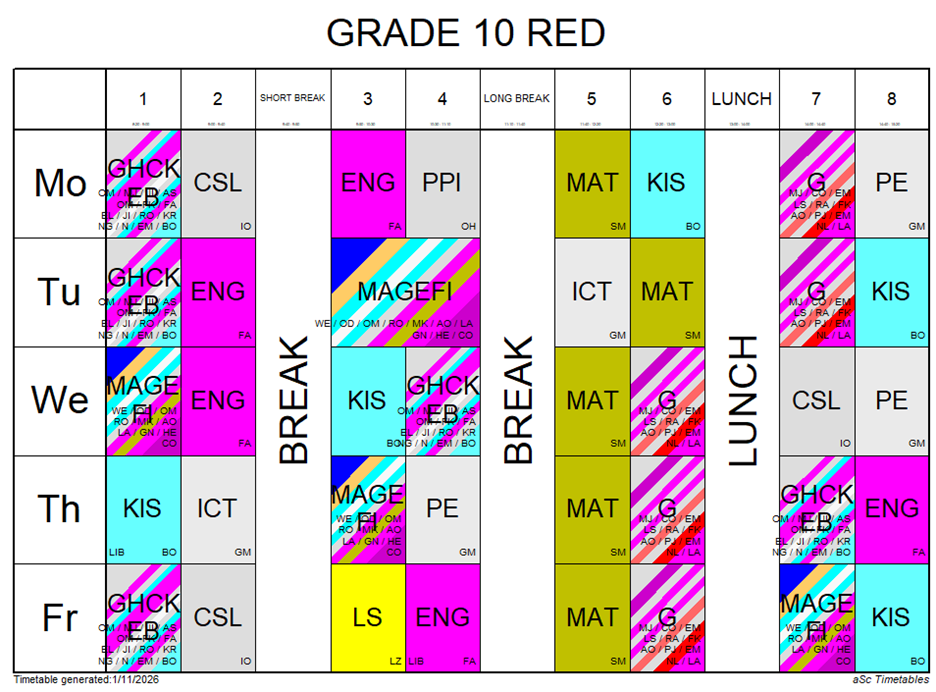
(Fasihi ya Kiswahili, Literature in English, Sign Language, French, German, Mandarin Chinese) - GHCKEB – 5 lessons
(G – Geography, H – History & Citizenship, C – CRE, K – Kiswahili (Fasihi)/Indigenous Language, E – English (Literature), B – Business Studies)
- GHCBEK – 5 lessons
(G – Geography, H – History & Citizenship, C – CRE, B – Business Studies, E – English (Literature), K – Kiswahili (Fasihi)/Indigenous Language)
Note: This blocking will allow students to pick any two or three subjects from the electives.
Support Subjects
- Physical Education (PE) – 3 lessons
- ICT – 2 lessons
- Pastoral/Religious Programme Instruction – 1 lesson
- Learner Personal/Group Study – 1 lesson
Sample Timetable for Grade 10 North (Social Sciences)

Sample Timetable for Grade 10 Red (Social Sciences)
C. Arts and Sports Sciences Pathway Subjects (40 Lessons per week)
Core Subjects
- English – 5 lessons
- Kiswahili / KSL – 5 lessons
- Core Mathematics / Essential Mathematics – 5 lessons
- Community Service Learning (CSL) – 3 lessons
Elective Subjects
- Music and Dance – 5 lessons
- Theatre and Film – 5 lessons
- Fine Arts – 5 lessons
Note: Our school cannot offer Sports and Recreation due to lack of resources.
Support Subjects
- Physical Education (PE) – 3 lessons
- ICT – 2 lessons
- Pastoral/Religious Programme Instruction – 1 lesson
- Learner Personal/Group Study – 1 lesson
Sample Timetable for Grade 10 Red (Art & Sport Science)

Step 4: Configure the ASc Timetable Software
In the ASc Timetable software:
- Create Grade 10 as a year group
- Create 12 streams and assign them to pathways
- Enter all subjects exactly as per weekly lesson allocation
- Define:
- Lesson length (40 minutes)
- School day start and end times
- Break durations
- Set constraints:
- Only one double lesson
- Core subjects as single lessons
- Balanced morning/afternoon distribution
Step 5: Create a Sample Daily Lesson Structure
| Period | Time |
| Assembly | 8.00 – 8.20 |
| Lesson 1 | 8.20 – 9.00 |
| Lesson 2 | 9.00 – 9.40 |
| Break 1 | 9.40 – 9.50 |
| Lesson 3 | 9.50 – 10.30 |
| Lesson 4 | 10.30 – 11.10 |
| Break 2 | 11.10 – 11.40 |
| Lesson 5 | 11.40 – 12.20 |
| Lesson 6 | 12.20 – 1.00 |
| Lunch | 1.00 – 2.00 |
| Lesson 7 | 2.00 – 2.40 |
| Lesson 8 | 2.40 – 3.20 |
Step 6: Plot Subjects Stream by Stream
Timetabling should be done pathway by pathway, not randomly.
STEM Streams (10B, 10C, 10E, 10G, 10N, 10R)
- Rotate elective options across streams
- Avoid placing Mathematics after Physics or Chemistry consecutively
- Place double lessons strategically (labs or practicals)
Social Sciences Streams (10W, 10P, 10V, 10I, 10O)
- Alternate language-heavy and humanities subjects
- Balance literature and content-based subjects
- Distribute electives evenly across the week
Arts & Sports Sciences Stream (10A)
- Place the double lesson within arts subjects
- Ensure creative subjects are balanced with core subjects
- Avoid clustering practical subjects in one day
Step 7: Validate and Optimize the Timetable
Before approval:
- Confirm 40 lessons per week per stream
- Check teacher clashes
- Ensure subject balance
- Verify compliance with KICD guidelines
- Test learner workload distribution
Conclusion
A well-designed Senior School Grade 10 timetable supports academic rigor, learner well-being, and effective resource use. By following official guidelines, analysing school data, and using timetabling software correctly, schools can create compliant, balanced, and learner-centered timetables across all three pathways.



Good layout
Good afternoon to to you i am just thinking so many things right now but time to time i am going to understand.
Good layout keep it up
Great work
good work
Good job,even someone who has not yet attended the retooling can have some light from this
Good but Remember it must have both paths in an institution,also the 8:4:4 syllabus is in one institution.Guid us there.
I’m
I love it thanks alot
There’s a situation where a stem student takes one humanity like business. How do you capture it in the timetable
It looks worktable